Is There a Free Skool Video Downloader? Yes — Here's What 'Free' Actually Means
Short answer: yes — and more free than you'd expect. What's free forever, what's a one-time trial in disguise, and the free route around the weekly download limit.

Short answer: yes. Longer answer: it depends heavily on what you mean by "free," because a couple of the results you'll find calling themselves free are actually one-time trials with a hard stop.
The distinction that matters before you install anything: a real free tier keeps working indefinitely at no cost, even if it's limited. A free trial gives you a handful of downloads once, then requires payment forever after — "free" only describes your first few minutes with the product.
What's actually out there
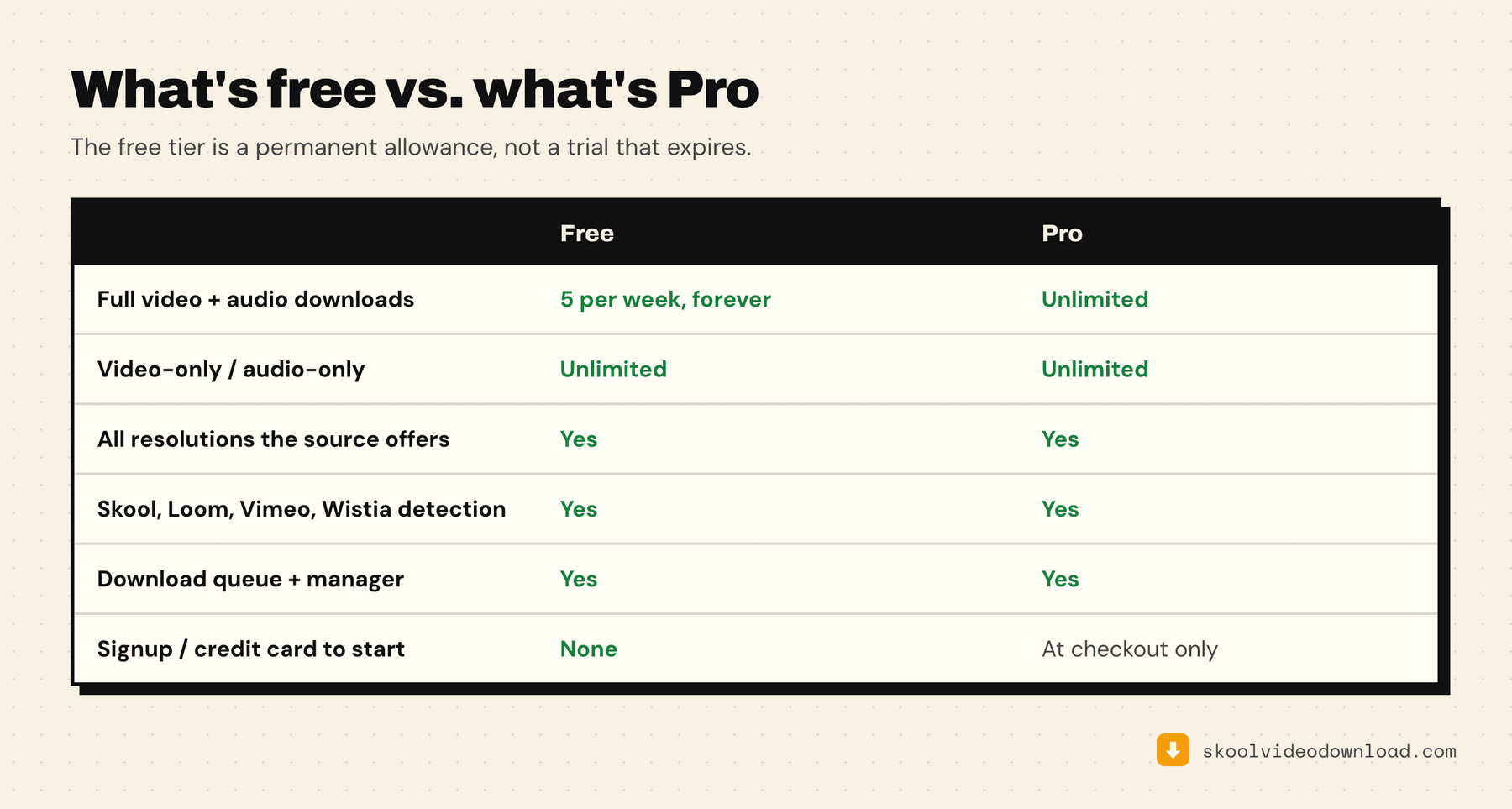
Skool Video Downloader (this extension). 5 full MP4 downloads every week, forever — the limit resets weekly, not a one-time allowance. No signup, no email, no credit card. It covers Skool's native (Mux) player plus Loom, Vimeo, and Wistia embeds. Pro ($9.99/month, or a one-time $99.99 lifetime option) removes the weekly limit entirely.
Downloader for Skool (serp.co). Requires an email sign-up before your first download. Once signed up, you get 3 downloads — based on the public listing, this reads as a one-time allowance rather than something that resets weekly. After that, it's $37/month for unlimited downloads. That's a trial, not a free tier.
For a fuller field including the non-extension routes, see the comparison of every free Skool downloader option, or the direct head-to-head between the two main extensions.
skoolvideodownloader.com. No free tier at all — $9/month from the first download, with a 14-day money-back guarantee if you want to test it and cancel.
If a Skool downloader asks for your email before your first download, that's usually the tell you're looking at a lead-capture trial, not a genuine free tier. A tool with an actual free tier doesn't need your contact info to let you use it.
Why "3 downloads" keeps showing up
Three appears to be a common ceiling several tools converge on before asking for payment — probably because it's enough to prove the tool works without giving away enough value to replace a paid plan. The difference that actually matters is whether that number resets:
- Resets weekly, forever: you get more every week, indefinitely, with no expiration on the free tier itself.
- One-time trial: you get a handful, period, and the product is unusable without payment after that.
Read the fine print (or just try it) before assuming "X free downloads" means the same thing everywhere.
What's free vs. what's Pro
The weekly count applies to merged files — a single MP4 containing both video and audio, which is what most people want. You get 5 of those per week, across every supported platform, and the count resets weekly rather than running out.
What the count doesn't apply to: video-only and audio-only downloads are free forever, with no limit. Those skip the in-browser merge step entirely, so they never spend a credit. That matters more than it sounds — if you're archiving a course to listen to rather than watch, audio-only downloads cost you nothing at all, in any quantity.
Queueing is unlimited either way. The cap is on how many finished merged files you get per week, not on how many lessons you can line up in one sitting.
The free route around the weekly limit, spelled out
Here's the part worth being direct about, because it's genuinely a way to download every Skool lesson for free and we'd rather you heard it from us than felt tricked later.
When a lesson's stream carries video and audio as separate tracks — which is how Skool's native player and most HLS sources work — the extension shows you three buttons instead of one: Download video + audio, Video only, and Audio only. The first spends one of your five weekly credits. The other two don't, ever, in any quantity.
So if you're willing to do one extra step per lesson:
- Download the video only file. It uses the best rendition available, so you're not trading away quality to take this route.
- Download the audio only file for the same lesson.
- Merge the two locally. Free tools handle this in seconds — drop both into HandBrake or VLC, or run one line of ffmpeg:
ffmpeg -i "lesson-video.mp4" -i "lesson-audio.m4a" -c copy "lesson.mp4"
That's a complete, watchable MP4 of the lesson, at full source quality, without touching the weekly five. Do it for a hundred lessons if you want — the extension won't stop you, because those downloads never spend a credit by design.
So what is Pro actually for? Skipping that merge step. Pro means you click download once, the extension merges in the browser, and a finished file lands in your downloads folder. It's paying for convenience at scale, not for access — and if you're archiving a whole course across dozens of lessons, doing the two-file dance manually every time gets old fast. That's a real trade you're free to make either way.
Is 5 a week actually enough?
For most people working through a course rather than archiving a library, yes. Five lessons a week is roughly the pace of an average cohort-style course, and the allowance refills whether or not you used it.
Where it stops being enough is the merged-file convenience case: backing up a 40-lesson course before a membership lapses without doing 40 manual merges. If you don't mind the merge step, the free tier already covers unlimited archival — see above.